Dynadot
Dynadot PomoćTrebate podršku za vaše Dynadot domene, web stranice ili jedan od naših alata? Koristite naš direktorij pomoćnih članaka kako biste pronašli resurse koji su vam potrebni ili kontaktirajte naš tim za podršku za dalju pomoć.
Popularne pretrage :prodati domentransfer domenabackorderpopustistekla aukcija
How can I update my website using Classic FTP?
Ažurirano: 2008/06/05Pregledano puta: 0
You can use Classic FTP (File Transfer Program) with our Email Hosting. To update your website using Classic FTP, please follow these steps:
- Download Classic FTP.
- Install the program on your computer.
- Retrieve your FTP login details.
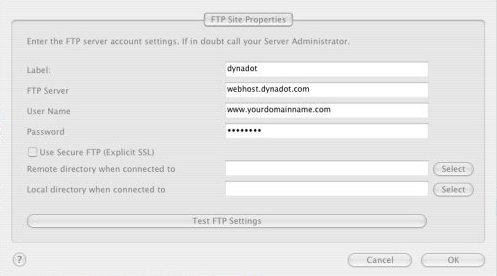
- Start the FTP program and enter in your account information as shown below, making sure that the "Use Secure FTP" box is left unchecked. Then press the "OK" button:
- You should now be connected to your Dynadot Email Hosting account as shown below:
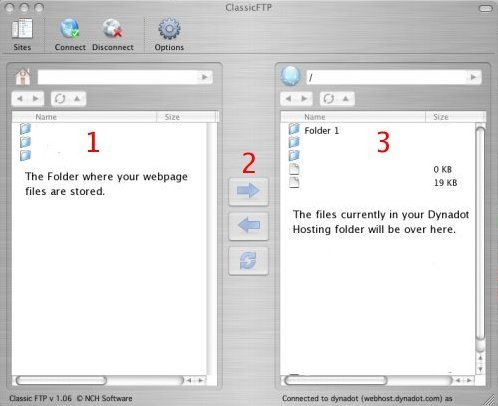
- At the top of box 1, you locate the folder on your hard drive where your web page files are stored. Select the files you want to transfer to your Dynadot Email Hosting account and then press the arrow shown at #2. Your files will then be transferred into your account.

Još uvek vam je potrebna pomoć?
pogledajte naše resurse