Dynadot
Помощь DynadotНужна поддержка ваших доменов Dynadot, веб-сайтов или одного из наших инструментов? Используйте наш справочник статей, чтобы найти необходимые ресурсы, или свяжитесь с нашей службой поддержки для получения дальнейшей помощи.
Популярные поиски :продать доменпередать доменбэк-ордерскидкаистекший аукцион
How can I update my website using Classic FTP?
Обновлено: 2008/06/05Просмотров: 0
You can use Classic FTP (File Transfer Program) with our Email Hosting. To update your website using Classic FTP, please follow these steps:
- Download Classic FTP.
- Install the program on your computer.
- Retrieve your FTP login details.
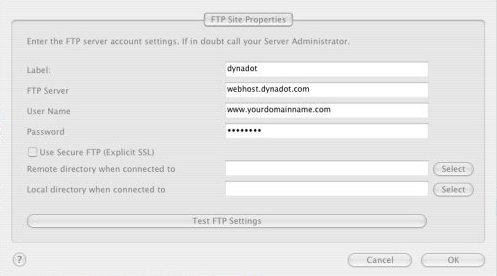
- Start the FTP program and enter in your account information as shown below, making sure that the "Use Secure FTP" box is left unchecked. Then press the "OK" button:
- You should now be connected to your Dynadot Email Hosting account as shown below:
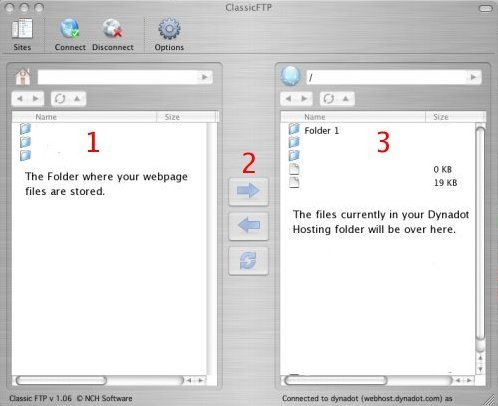
- At the top of box 1, you locate the folder on your hard drive where your web page files are stored. Select the files you want to transfer to your Dynadot Email Hosting account and then press the arrow shown at #2. Your files will then be transferred into your account.

Все еще нужна помощь?
ознакомьтесь с нашими ресурсами