Dynadot
Bantuan DynadotButuh dukungan untuk domain Dynadot, situs web, atau salah satu alat kami? Gunakan direktori artikel bantuan kami untuk menemukan sumber daya yang Anda butuhkan atau hubungi tim dukungan kami untuk mendapatkan bantuan lebih lanjut.
Pencarian Populer :jual domaintransfer domainbackorderdiskonlelang kedaluwarsa
How can I update my website using Classic FTP?
Diperbarui: 2008/06/05Dilihat kali: 0
You can use Classic FTP (File Transfer Program) with our Email Hosting. To update your website using Classic FTP, please follow these steps:
- Download Classic FTP.
- Install the program on your computer.
- Retrieve your FTP login details.
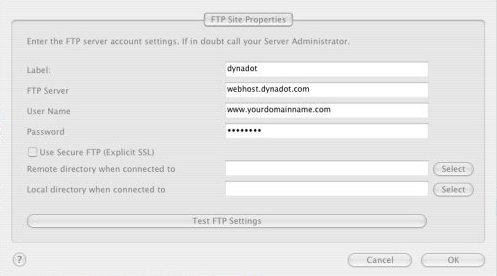
- Start the FTP program and enter in your account information as shown below, making sure that the "Use Secure FTP" box is left unchecked. Then press the "OK" button:
- You should now be connected to your Dynadot Email Hosting account as shown below:
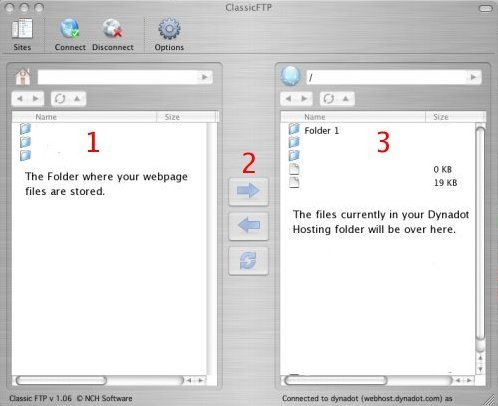
- At the top of box 1, you locate the folder on your hard drive where your web page files are stored. Select the files you want to transfer to your Dynadot Email Hosting account and then press the arrow shown at #2. Your files will then be transferred into your account.

Masih Membutuhkan Bantuan?
lihat sumber daya kami