Dynadot
Dynadot帮助需要支持您的Dynadot域名、网站或我们的工具吗?使用我们的帮助文章目录查找所需资源,或联系我们的支持团队获取进一步协助。
热门搜索 :出售域名转移域名抢注折扣过期拍卖
How can I update my website using Classic FTP?
已更新: 2008/06/05浏览次数: 0
You can use Classic FTP (File Transfer Program) with our Email Hosting. To update your website using Classic FTP, please follow these steps:
- Download Classic FTP.
- Install the program on your computer.
- Retrieve your FTP login details.
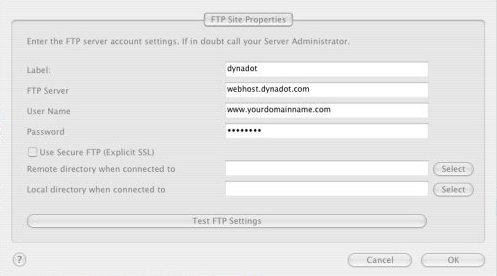
- Start the FTP program and enter in your account information as shown below, making sure that the "Use Secure FTP" box is left unchecked. Then press the "OK" button:
- You should now be connected to your Dynadot Email Hosting account as shown below:
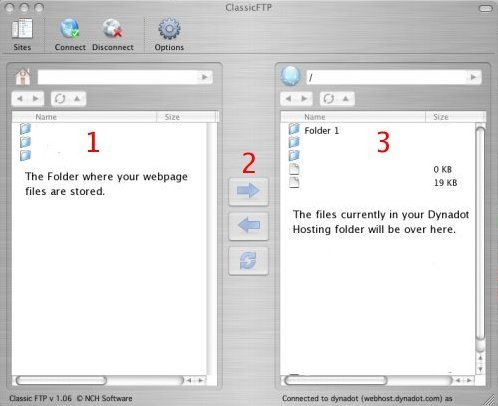
- At the top of box 1, you locate the folder on your hard drive where your web page files are stored. Select the files you want to transfer to your Dynadot Email Hosting account and then press the arrow shown at #2. Your files will then be transferred into your account.

仍需帮助?
查看我们的资源