Dynadot
Dynadot 도움말Dynadot 도메인, 웹사이트 또는 우리의 도구 중 하나에 대한 지원이 필요하신가요? 필요한 리소스를 찾거나 추가 지원을 받기 위해 지원 팀에 연락하려면 도움말 문서 디렉토리를 사용하세요.
인기 검색어 :도메인 판매도메인 이전백오더할인만료된 경매
How can I update my website using Classic FTP?
업데이트됨: 2008/06/05조회 수: 0
You can use Classic FTP (File Transfer Program) with our Email Hosting. To update your website using Classic FTP, please follow these steps:
- Download Classic FTP.
- Install the program on your computer.
- Retrieve your FTP login details.
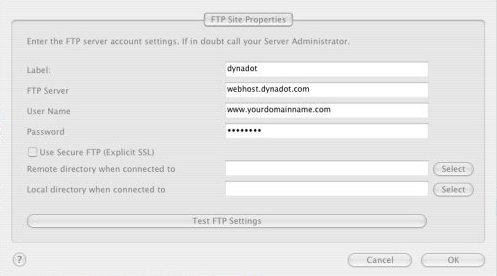
- Start the FTP program and enter in your account information as shown below, making sure that the "Use Secure FTP" box is left unchecked. Then press the "OK" button:
- You should now be connected to your Dynadot Email Hosting account as shown below:
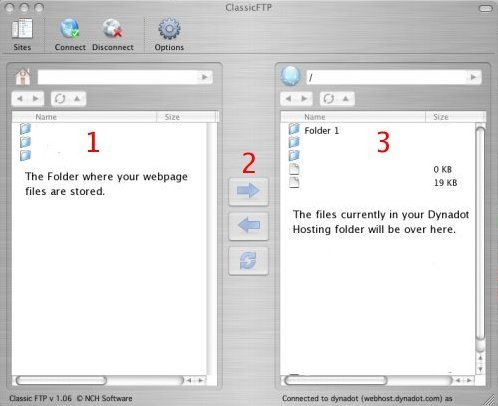
- At the top of box 1, you locate the folder on your hard drive where your web page files are stored. Select the files you want to transfer to your Dynadot Email Hosting account and then press the arrow shown at #2. Your files will then be transferred into your account.

여전히 도움이 필요하신가요?
우리의 자료 확인