Dynadot
DynadotヘルプDynadotのドメイン、ウェブサイト、またはツールのサポートが必要ですか?必要なリソースを見つけるためのヘルプ記事ディレクトリを使用するか、サポートチームに連絡してさらに支援を受けてください。
人気検索 :ドメインを売るドメインを転送バックオーダー割引期限切れオークション
How can I update my website using Classic FTP?
更新しました: 2008/06/05閲覧回数: 0
You can use Classic FTP (File Transfer Program) with our Email Hosting. To update your website using Classic FTP, please follow these steps:
- Download Classic FTP.
- Install the program on your computer.
- Retrieve your FTP login details.
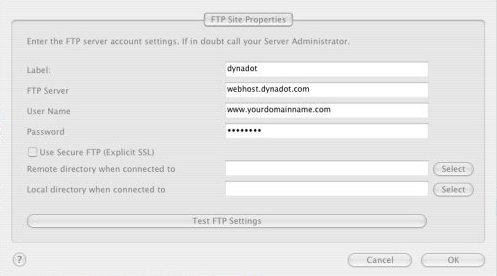
- Start the FTP program and enter in your account information as shown below, making sure that the "Use Secure FTP" box is left unchecked. Then press the "OK" button:
- You should now be connected to your Dynadot Email Hosting account as shown below:
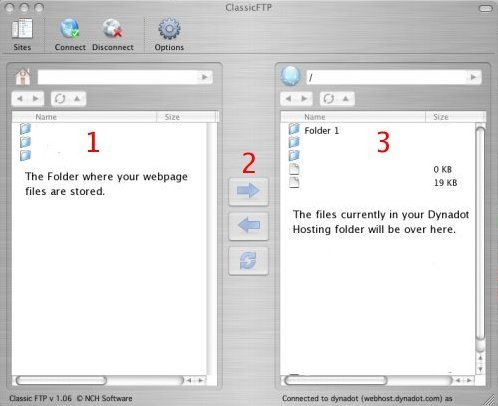
- At the top of box 1, you locate the folder on your hard drive where your web page files are stored. Select the files you want to transfer to your Dynadot Email Hosting account and then press the arrow shown at #2. Your files will then be transferred into your account.

まだ助けが必要ですか?
リソースをチェックする